How do computers work?
This is a basic explanation of how computers work.
The computer only understands on and off.
Darkened lamp shown below is the digit zero (0)
Bright lamp shown below is the digit one (1)
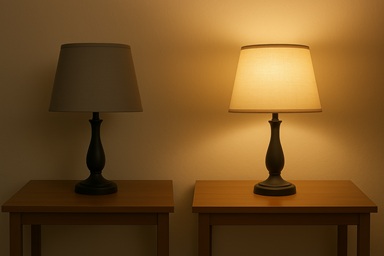
That is all that the computer really knows.
Programmers use detailed combinations of 1's and 0's to make the computer work.
If the computer is expecting a number then here is how it counts from one to ten.
0000 0
0001 1
0010 2
0011 3
0100 4
0101 5
0110 6
0111 7
1000 8
1001 9
1010 10
A meter like a gasoline pump, in DECIMAL, in the USA looks like this.
00
01
02
03
04
05
06
07
08
09
10
With this meter, after it reaches 09, what it does next is announce that it has "1" group of ten.
The computer counting above is doing the same thing but with groups of TWO.
First a 0.
Second a 1.
Third it has "1" group of TWO.
So with the rest of the counting the "1" keeps shifting to the left, and clearing the space for the next zero.
This concept is important to know because you will see the word BINARY over and over again. That is what the computer really works in, a BINARY number system.
I am going to introduce another thought here. You can skip it if it is too much to think about right now and come back to it later.
To make computer programming much easier for human programmers, many books are written discussing the HEXADECIMAL numbering system, or HEX for short. You saw at the very top of this lesson how the BINARY number system, groups of TWO work. Then we showed the DECIMAL number system, with groups of TEN. HEXADECIMAL is simply groups of SIXTEEN. Watch how it counts.
0000 0
0001 1
0002 2
0003 3
0004 4
0005 5
0006 6
0007 7
0008 8
0009 9
000A 10
Look at that!
We do not get a GROUP, we do not get a "1" "0" until we arrive at 16. Here is the rest.
000B 11
000C 12
000D 13
000E 14
000F 15
0010 16
Most computer programmers do not need to work much with BINARY or HEXADECIMAL numbers. But one day as a professional programmer you will encounter them so it is important to not think it is some kind of confusing magic. As I just said, most computer programmers do not need to work at this low level so do not be afraid of computer programming by thinking you need to work with these detailed codes all the time.
You saw at the top of this lesson the two lamps, one off, and one on, which was a zero (0), then a one (1).
Each of these is called a BIT. You will see that word many times in computer programming books.
When there are eight (8) BITs, then this is called a BYTE. So 8 BITs make one BYTE.
In the next OVERVIEW lesson I will explain some more basics.